User Guide
Managing dozens of guests, AB3 My Guest is your go-to wedding planner which supports bulk tagging, layer filtering, and a dedicated RSVP field to track your wedding’s attendees!
AB3 My Guest is a desktop app for managing wedding guests, optimized for use via a Command Line Interface (CLI) while still having the benefits of a Graphical User Interface (GUI). If you can type fast, AB3 My Guest can get your guest management tasks done faster than traditional methods of managing guest lists!
- Quick start
-
Features
- Viewing help :
help - Listing all guests :
list - Adding a guest :
add - Deleting a guest :
delete - Editing a guest :
edit - Creating a new tag :
newtag - Deleting an existing tag :
deletetag - Renaming a tag :
renametag - Tagging a guest :
tag - Removing a tag from a guest :
untag - Setting RSVP status for a guest :
setrsvp - Filtering using RSVP status or tags :
filter - Locating guests by name :
find - Undoing latest command :
undo - Clearing all entries :
clear - Exiting the program :
exit - Saving the data
- Editing the data file
- Archiving data files
[coming in v2.0]
- Viewing help :
- FAQ
- Known issues
- Command summary
Quick start
-
Ensure you have Java
17or above installed in your computer. To check, open a command terminal, and typejava -version. -
Download the latest
.jarfile from here. -
Copy the file to the folder you want to use as the home folder for your AB3 My Guest application.
-
To open the application,
- Open a command terminal in your computer.
-
cdinto the folder you put the jar file in (e.g If the jar file is stored in/Desktop/TestFile, then the command should becd /Desktop/TestFile). - Use the
java -jar ab3myguest.jarcommand to run the application.
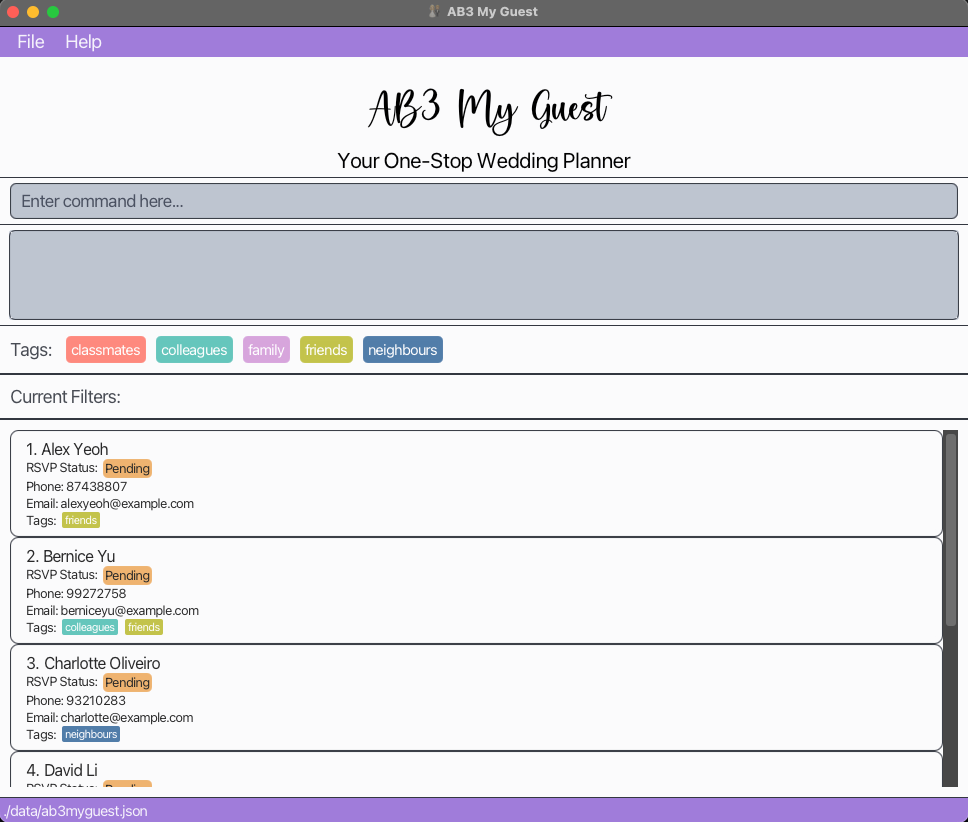
- A GUI similar to the below should appear in a few seconds. Note how the app contains some sample data.
-
Type the command in the command box and press Enter to execute it. e.g. typing
helpand pressing Enter will open the help window.
Some example commands you can try:-
list: Lists all guests. -
add n/John Doe p/98765432 e/johndoe@example.com: Adds a guest namedJohn Doeto the guest list. -
delete 3: Deletes the 3rd guest shown in the current list. -
clear: Deletes all contacts. -
exit: Exits the app.
-
- Refer to the Features below for details of each command.
- Do note that users should open only one AB3 My Guest at a time.
Features
 Notes about the command format:
-
Words in
UPPER_CASEare the parameters to be written by the user.
e.g. inadd n/NAME p/PHONE_NUMBER e/EMAIL,NAME,PHONE_NUMBERandEMAILare parameters which are user inputs, such asadd n/John Doe p/91234567 e/johndoe@example.com. -
Items in square brackets are optional.
e.g.n/NAME [t/TAG]can be used asn/John Doe t/bride's sideor asn/John Doe. -
Items with
… after them can be used multiple, including zero times.
e.g.[t/TAG]…can be used ast/friends,t/friends t/familyetc. -
Parameters can be in any order.
e.g. theaddcommand specifiesn/NAME p/PHONE_NUMBER,p/PHONE_NUMBER n/NAMEis also acceptable. -
Only leading and trailing spaces in tag and guest names will be ignored, for increased flexibility. e.g.
bride's friendandbride's sideare considered different tags. e.g.John DoeandJohn Doeare considered different guests. e.g. ` bride’s friendandbride’s sideare considered the same tag. e.g.john doe ` andjohn doeare considered the same guest. -
Extraneous parameters for commands that do not take in parameters (such as
help,list,exit,clear,undo) will be ignored.
e.g. if the command specifieshelp 123, it will be interpreted ashelp. -
If you are using a PDF version of this document, be careful when copying and pasting commands that span multiple lines as space characters surrounding line-breaks may be omitted when copied over to the application.
Viewing help : help
Shows a message explaining how to access the help page.
Format: help
Listing all guests : list
Shows a list of all guests in the guest list.
Format: list
Adding a guest : add
Adds a guest to the guest list.
Format: add n/NAME p/PHONE_NUMBER e/EMAIL [t/TAG]…
- Names cannot be more than 100 characters long.
- Names are case-sensitive, for increased flexibility. e.g. ‘John Doe’ is different from ‘john doe’.
- Names can only consist of alphanumeric characters and spaces.
-
Duplicate guests (with the exact same name) cannot be added to the guest list. Users are advised to add their guests’ last names or other identifiers if needed.
- Phone numbers must be exactly 8 digits.
- Tags must be created before they can be assigned to a guest. Refer to newtag on how to create a tag.
 Tip:
A guest can have any number of tags (including 0).
Tip:
A guest can have any number of tags (including 0).
Examples:
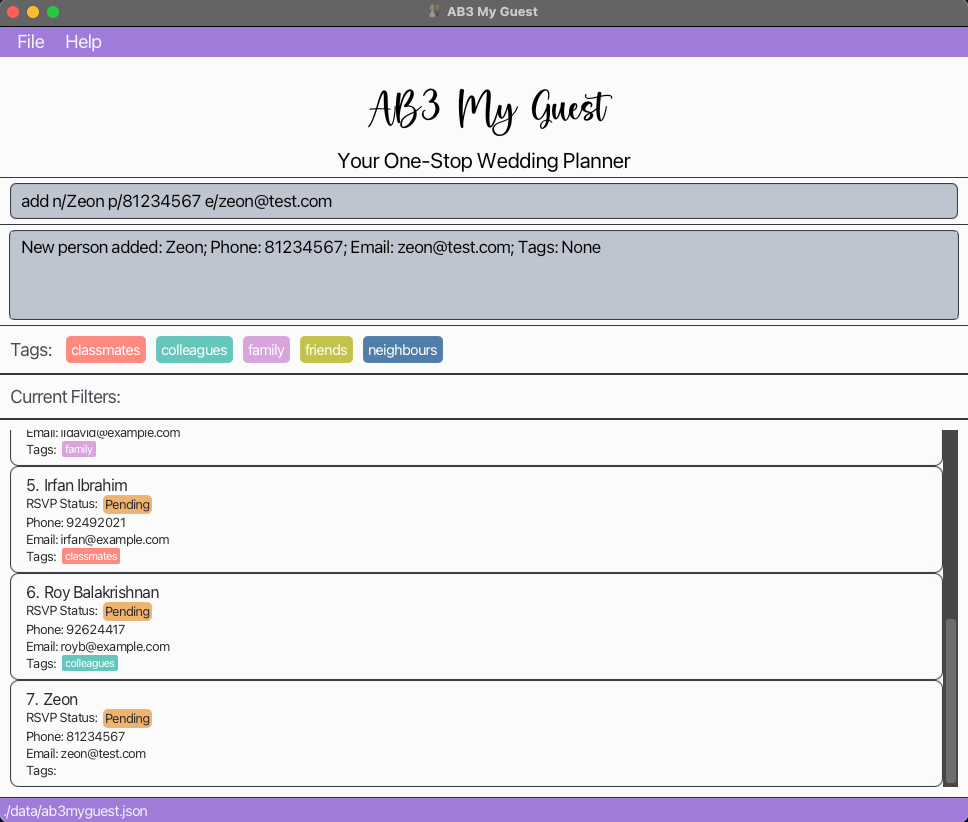
add n/John Doe p/98765432 e/johnd@example.com t/groom's sideadd n/Betsy Crowe p/81234567 e/betsycrowe@example.com t/bride's sideadd n/Zeon p/81234567 e/zeon@example.com
Deleting a guest : delete
Deletes the specified guest from the currently displayed guest list.
Format: delete INDEX
- Deletes the guest at the specified
INDEX. - Only one guest can be deleted in each delete command.
- The index refers to the index number shown in the displayed guest list.
- The index must be within the index boundaries of the guest list. i.e. If there are 10 guests, INDEX accepts values from 1 to 10.
Examples:
-
listfollowed bydelete 2deletes the 2nd guest in the guest list. -
find yufollowed bydelete 2deletes the 2nd guest in the results of thefindcommand.
Editing a guest : edit
Edits an existing guest in the currently displayed guest list.
Format: edit INDEX [n/NAME] [p/PHONE] [e/EMAIL]
- Edits the guest at the specified
INDEX. The index refers to the index number shown in the displayed guest list. - The index must be within the index boundaries of the guest list. i.e. If there are 10 guests, INDEX accepts values from 1 to 10.
- At least one of the optional fields must be provided.
- Fields which are not provided will not be edited.
- Editing the guest without changing the fields is allowed. e.g. The guest at index 1 of the displayed list is Alex Yeoh. Running
edit 1 n/Alex Yeohwill be successful though none of the fields are changed. - All optional fields must adhere to the restrictions specified in the
addcommand. - If the input values are valid, existing values will be updated to the input values.
- Tags associated with a guest cannot be edited using this command. Use
tagoruntagto do so instead.
Examples:
edit 1 p/91234567 e/johndoe@example.comedit 1 n/Alan Yeoh
Creating a new tag : newtag
Creates new tag(s) that can be used to tag guests with.
Format: newtag t/TAG1…
- Each tag name cannot be more than 50 characters long.
- Tag name can only contain alphanumeric characters, apostrophes, parenthesis and whitespaces.
- Tag name cannot be empty, or consist of only whitespaces.
- Duplicate tags are not allowed.
- Tag names are case-insensitive. e.g.
newtag t/BRIDE'S SIDEis the same asnewtag t/Bride's Side - Only 30 (or fewer) tags can exist in the tag list at any point. Attempts to add tags that could exceed this limit will not be allowed.
- Additional leading entries will be ignored. e.g.
newtag 1 t/bride's sideis the same asnewtag t/bride's side. - Duplicate tags (with the same name) are not allowed.
- Tag names are case-insensitive. e.g
newtag t/BRIDE'S SIDEis the same asnewtag t/Bride's Side - Only 30 (or fewer) predefined tags can exist at any point.
- Attempting to add tags with a mix of invalid and valid names at once will result in an error.
- Attempting to add tags with a mix of duplicate and non-duplicate names at once will only allow the non-duplicate tags to be added.
Tip:
You may add any number of tags at once (as long as the total number does not exceed 30). e.g. newtag t/bride's side t/groom's side t/friends
Examples:
newtag t/bride's sidenewtag t/bride's side t/groom's side
Deleting an existing tag : deletetag
Deletes existing tag(s) defined previously.
Format: deletetag [-force] t/TAG1…
- Each tag name cannot be more than 50 characters long.
- Tag name can only contain alphanumeric characters, apostrophes, parenthesis and whitespaces.
- Tag name cannot be empty, or consist of only whitespaces.
- User cannot delete a tag that has not been added via
newtagbefore. - Tag names are case-insensitive. e.g.
deletetag t/BRIDE'S SIDEis the same asdeletetag t/Bride's Side. - Additional leading entries will be ignored. e.g.
deletetag 1 t/bride's sideis the same asdeletetag t/bride's side. - If any guest currently has the tag
friends,deletetag t/friendswill not work. To force delete the tag and remove it from all guests, usedeletetag -force t/friends. - Tag names are case-insensitive. e.g
deletetag t/BRIDE'S SIDEis the same asdeletetag t/Bride's Side. - Attempting to delete tags with a mix of invalid and valid names at once will result in an error.
- Attempting to delete tags with a mix of existing and non-existent tags at once will only allow the existing tags to be deleted.
Tip:
You may delete any number of tags at once. e.g. deletetag t/bride's side t/groom's side t/friends
Examples:
deletetag t/bride's sidedeletetag t/bride's side t/groom's sidedeletetag -force t/bride's side
Renaming a tag : renametag
Renames a tag currently in the tag list.
Format: renametag t/TAG1 t/TAG2
- Renames the tag
TAG1(target) to becomeTAG2. - Only one tag can be renamed in each rename command.
- The new tag name cannot be a tag already in the current tag list.
e.g.friendsandcolleaguesalready exist in the tag list.renametag t/friends t/colleaguesis an invalid command. - The target tag must be a tag that is already in the current tag list.
e.g.friendsalready exists in the tag list butcolleaguesdoes not.renametag t/colleagues t/friendsis an invalid command. - Extra parameters are not allowed.
Examples:
renametag t/friends t/colleagues
Tagging a guest : tag
Tags a guest with the specified tag.
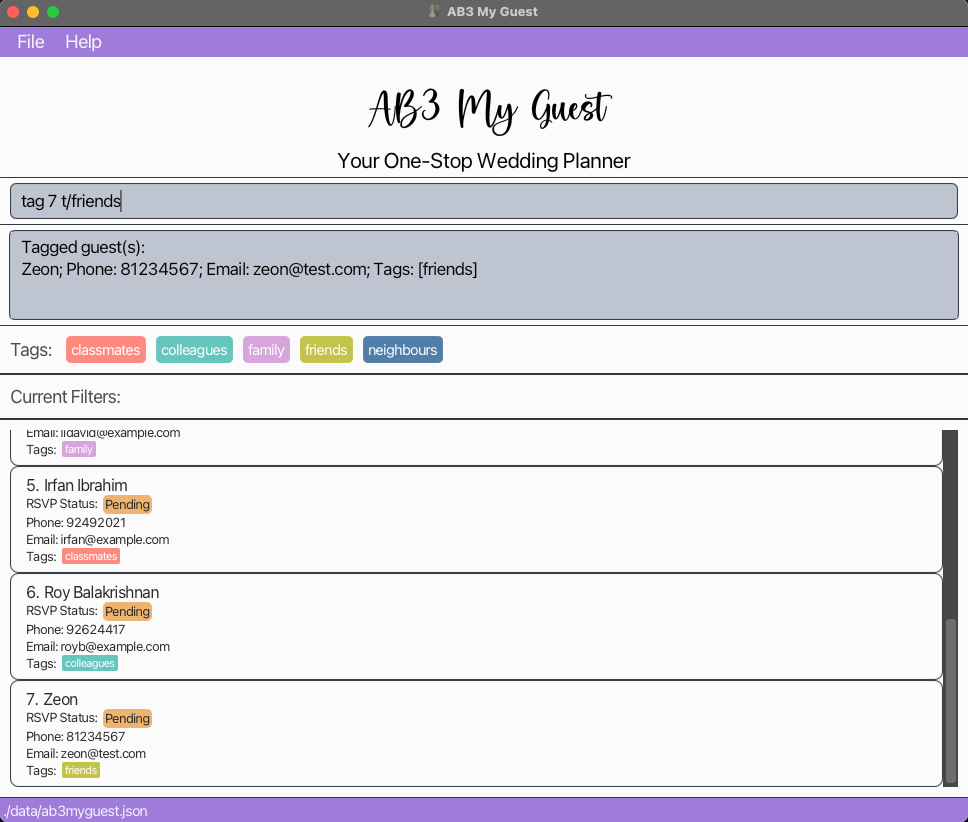
Format: tag INDEX… t/TAG…
- Tag must have already been defined using
newtagbefore tagging it to a guest. - There is a limit of 10 indexes that can be tagged in a single
tagcommand. - The index(es) must be within the index boundaries of the guest list. ie. If there are 15 guests, INDEX accepts values from 1 to 15.
- Duplicate tags in the input will be ignored. e.g.
tag 1 t/friends t/friendswill successfully execute assuming the guest at index 1 does not already have the tagfriends. - Attempting to tag guests with an invalid tag will not halt tagging of valid tags.
e.g.friendsis a tag not created whilebride's sideis. The commandtag 1 t/friends t/bride's sidewill still successfully tagbride's sideon the guest indexed at 1. - Attempting to tag guests with a tag already on some will not halt tagging of the tag on other guests.
e.g.friendsis a tag on guest indexed at 1 but not on guest indexed at 2. The commandtag 1 2 t/friendswill still successfully tagfriendson the guest indexed at 2.
Examples:
tag 1 t/bride's sidetag 1 2 3 t/bride's sidetag 1 t/bride's side t/friendstag 1 2 3 t/bride's side t/friends
Removing a tag from a guest : untag
Removes a tag from a guest.
Format: untag INDEX… t/TAG…
- A guest must already have the tag for it to be removed.
- Index(es) of the guest(s) must be within valid range (i.e. greater than 0 and less than or equals to the current shown list length)
- Duplicate tags in the input will be ignored. e.g.
untag 1 t/friends t/friendswill successfully execute assuming the guest at index 1 has the tagfriends. - Attempting to untag guests with an invalid tag will not halt untagging of valid tags.
e.g.friendsis a tag not created whilebride's sideis. The commanduntag 1 t/friends t/bride's sidewill still successfully untagbride's sideon the guest indexed at 1. - Attempting to untag guests with a tag already on some will not halt untagging of the tag on other guests.
e.g.friendsis a tag on guest indexed at 1 but not on guest indexed at 2. The commanduntag 1 2 t/friendswill still successfully untagfriendson the guest indexed at 1.
Examples:
untag 1 t/bride's sideuntag 1 2 3 t/bride's sideuntag 1 t/bride's side t/friendsuntag 1 2 3 t/bride's side t/friends
Setting RSVP status for a guest : setrsvp
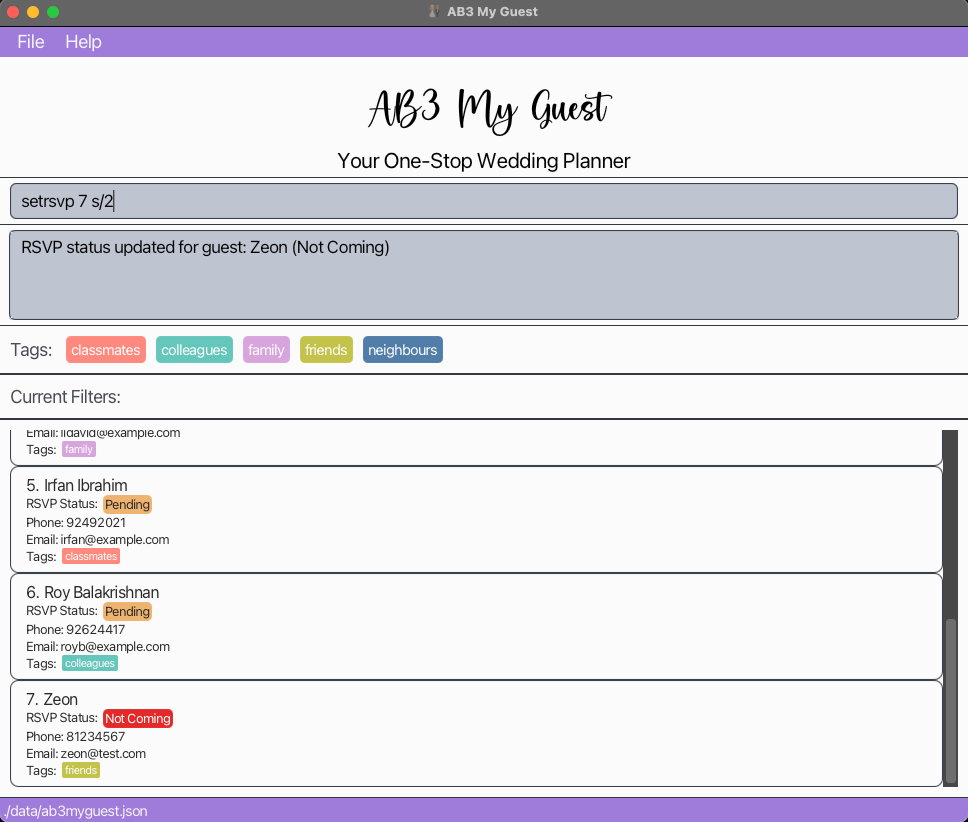
Toggles the RSVP status for a guest between Coming, Not Coming and Pending.
Format: setrsvp INDEX s/STATUS_INDEX
- Toggles the RSVP status of the guest at the specified
INDEX. The index refers to the index number shown in the displayed guest list. - The index must be within the index boundaries of the guest list. i.e. If there are 10 guests, INDEX accepts values from 1 to 10.
-
STATUS_INDEXaccepts 3 possible values:-
1representsComing -
2representsNot Coming -
3representsPending
-
- By default, the RSVP status for all guests is
Pending.
Note:
You may only set one guest’s RSVP status in each command. i.e. Setting multiple guests’ statuses at once is not supported.
Example:
setrsvp 1 s/1setrsvp 2 s/3setrsvp 1 s/2
Filtering using RSVP status or tags : filter
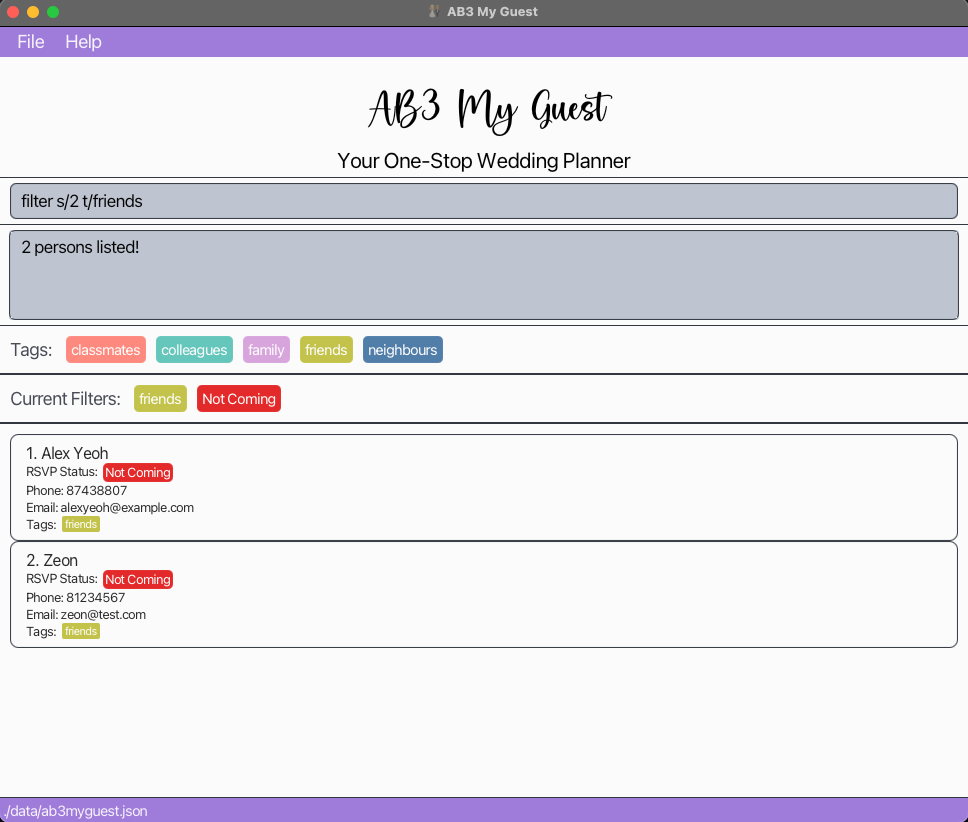
Filters the currently shown list based on RSVP status or tag. Filter predicates are displayed in the filter panel.
Format: filter [s/STATUS_INDEX] [t/TAG]…
- At least one of the optional fields must be provided.
-
STATUS_INDEXaccepts 3 possible values:-
1representsComing -
2representsNot Coming -
3representsPending
-
- The filter accepts multiple predicates. For example,
filter t/bride's side t/neighboursandfilter s/3 t/neighboursare both valid commands. - Note that
filter s/3 t/neighboursis equivalent to stacking the commandsfilter s/3andfilter t/neighboursinto a single command, or runningfilter t/neighbours s/3. - Only one RSVP status can be used for filtering in each command, but multiple tags can be used. i.e.
filter s/1 s/2is not a valid command. - The command will not be executed if one or more parameters are invalid.
Tip:
You can clear all filters by running the list command.
Known Issue:
Currently, running an add command while being in a filtered list returns the list displaying all the guests, though the filters are not cleared from the filter panel. For now, you may clear the filters using the list command.
Example:
filter s/1filter t/bride's side t/neighboursfilter s/3 t/neighbours-
filter s/1,filter s/2(will always return an empty list)
Locating guests by name : find
Finds guests whose names contain any of the given keywords.
Format: find KEYWORD…
- The search is case-insensitive. e.g.
alexwill matchAlex. - The order of the keywords does not matter. e.g.
Alex Yuwill matchYu Alex. - Only the name is searched.
- Only full words will be matched e.g.
Alewill not matchAlex. - Guests matching at least one keyword will be returned. i.e.
ORsearch. e.g.Alex Yuwill returnAlex Yeoh,Bernice YuandTerrence Yu. - Find will apply to the whole list, not the currently filtered list,
ignoring all previous filter and find commands.
i.e.
find alex berniceis not the same asfind alexfollowed byfind bernice.
Examples:
find alexfind alex yu
Undoing latest command : undo
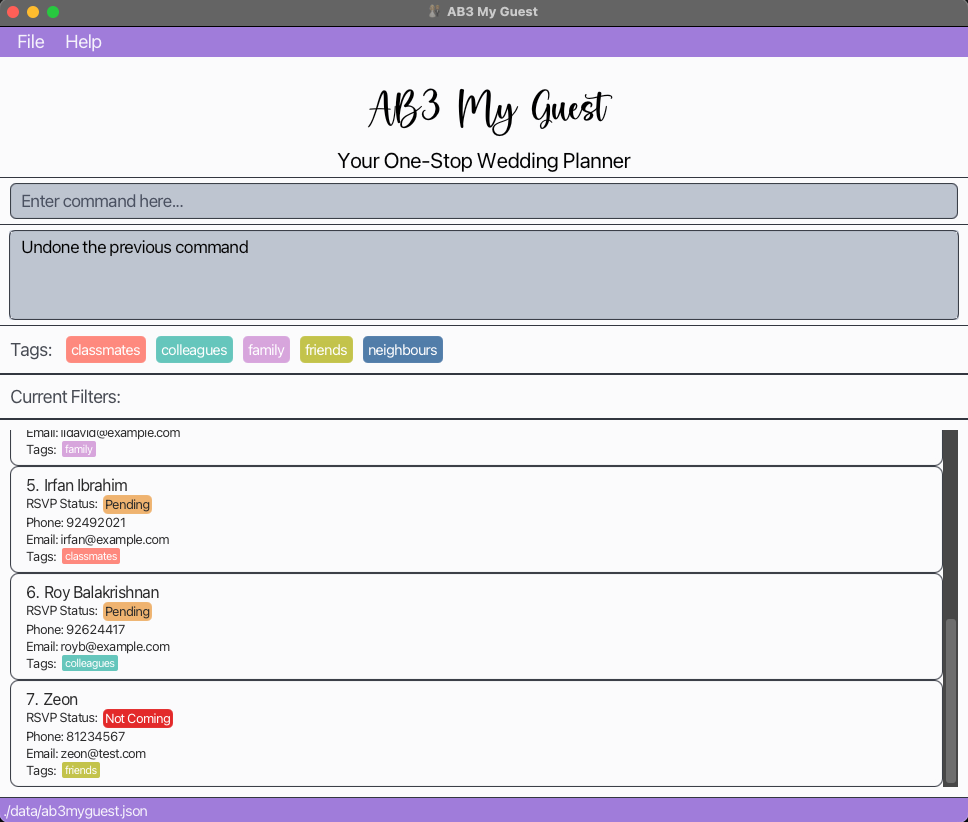
Undoes the changes made from the last command if it was successfully executed, partially or fully.
Format: undo
- Commands that can be undone:
adddeletenewtagdeletetagrenametagtaguntageditfilterfindsetrsvp
- Only the latest command can be undone, if it was successfully executed.
Examples:
-
tag 1 2 t/friendssuccessfully tagged the guest at index 1 but not the guest at index 2. Thenundowill untag the guest at index 1. -
filter s/3 t/friendsfollowed byfilter s/3(shows an error message since the filter predicate is already applied). Thenundowill not revert the first filter commandfilter s/3 t/friendssince the last command,filter s/3was not successfully executed. -
tag 7 t/neighbourssuccessfully tagged the guest at index 7.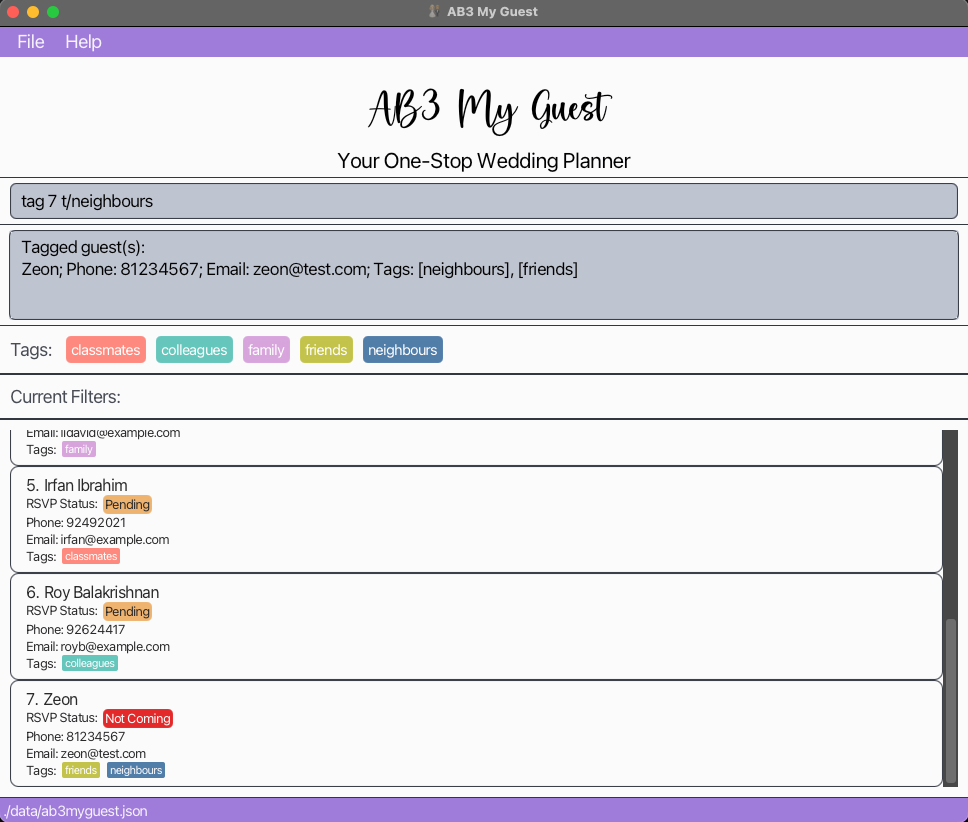
Clearing all entries : clear
Clears all entries from the guest list. i.e deleting all guests.
Format: clear
WARNING:
This command will permanently delete all guests in your guest list. Ensure that you have saved a copy of the guest list somewhere else.
Exiting the program : exit
Exits the program.
Format: exit
Saving the data
AB3 My Guest data is saved in the hard disk automatically after any command that changes the data. There is no need to save manually.
Editing the data file
AB3 My Guest data is saved automatically as a JSON file [JAR file location]/data/ab3myguest.json. Advanced users are welcome to update data directly by editing that data file.
 Caution:
If your changes to the data file makes its format invalid, AB3 My Guest will discard all data and start with an empty data file during the next run. Hence, it is recommended to make a backup of the file before editing it.
Caution:
If your changes to the data file makes its format invalid, AB3 My Guest will discard all data and start with an empty data file during the next run. Hence, it is recommended to make a backup of the file before editing it.Furthermore, certain edits can cause the AB3 My Guest application to behave in unexpected ways (e.g., if a value entered is outside the acceptable range). Therefore, edit the data file only if you are confident that you can update it correctly.
Archiving data files [coming in v2.0]
A future development is archiving data files to protect against accidental clear commands or corrupted data files which cannot be recovered.
This feature will allow users to archive data files, acting as a backup.
FAQ
Q: How do I transfer my data to another Computer?
A: Install the app in the other computer and overwrite the empty data file it creates with the file that contains the data of your previous AB3 My Guest home folder.
Q: I accidentally entered the command clear and removed my entire list of guests. How do I recover it?
A: Unfortunately, there is no way to recover the list. Hence, we recommend occasionally copying the JSON file at [JAR file location]/data/ab3myguest.json into a separate file saved in your computer.
Known issues
-
When using multiple screens, if you move the application to a secondary screen, and later switch to using only the primary screen, the GUI will open off-screen. The remedy is to delete the
preferences.jsonfile created by the application before running the application again. -
If you minimize the Help Window and then run the
helpcommand (or use theHelpmenu, or the keyboard shortcutF1) again, the original Help Window will remain minimized, and no new Help Window will appear. The remedy is to manually restore the minimized Help Window.
Command summary
| Command | Format, Examples |
|---|---|
| Help | help |
| List | list |
| Add |
add n/NAME p/PHONE_NUMBER e/EMAIL [t/TAG]… e.g. add n/John Doe p/91234567 e/johndoe@example.com t/groom's side
|
| Delete |
delete INDEXe.g. delete 3
|
| Edit |
edit INDEX [n/NAME] [p/PHONE_NUMBER] [e/EMAIL]e.g. edit 2 n/James Lee e/jameslee@example.com
|
| NewTag |
newtag t/TAG… e.g. newtag bride's side
|
| DeleteTag |
deletetag t/TAG… deletetag -force t/TAG… e.g. deletetag t/bride's side e.g. deletetag -force t/bride's side
|
| RenameTag |
renametag t/TAG1 t/TAG2 e.g. renametag t/friends t/colleagues
|
| Tag |
tag INDEX… t/TAG… e.g. tag 1 2 t/groom's side t/family
|
| Untag |
untag INDEX… t/TAG… e.g. untag 1 2 t/bride's side t/family
|
| SetRSVP | setrsvp INDEX STATUS_INDEX |
| Filter |
filter [s/STATUS_INDEX] [t/TAG]… e.g. filter s/3 t/neighbours
|
| Find |
find KEYWORD…e.g. find James Jake
|
| Clear | clear |
| Undo | undo |
| Exit | exit |